Troubleshooting CPDP350/500 C0121P LED Fault Codes
When the OTC DAIHEN CPDP350 / CPDP500 welding machine encounters an automatic shutdown protection, it primarily relies on the “Fault Indicator” on the control panel and the 4 LED signal lights on the internal C0121P main control board to diagnose the fault. These 4 LEDs present 14 specific abnormal states through different combinations of “ON (Solid), Flashing, and OFF.” This article thoroughly details the causes corresponding to these 14 abnormal combinations and the official troubleshooting guidelines to help you quickly restore production.
I. C0121P Mainboard LED Abnormality Indicator Guide
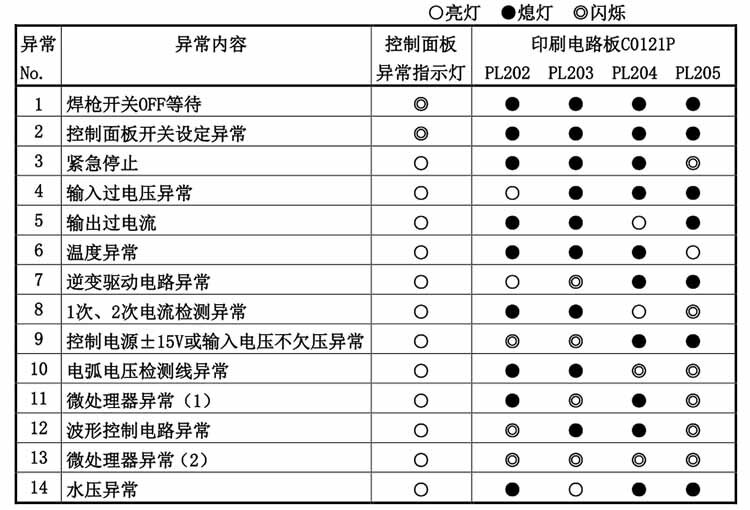
When the welder shuts down abnormally, please completely disconnect the power and wait 5 minutes for the capacitors to discharge. Then, open the chassis side panel and reconnect the control power. Refer to the sticker inside the chassis (as shown in the figure below) to determine the abnormality code (1 to 14) based on the state combination of the 4 LEDs.
Figure: 14 State Combinations of the 4 LED Signal Lights on the C0121P PCB
II. Causes and Solutions for the 14 Abnormal States
Please find the corresponding official troubleshooting countermeasures in the cards below based on the fault combination number (1-14) you identified from the image above:
1. Torch Switch OFF Wait
Cause: The torch switch is in the ON position upon startup; the safety anti-accidental touch circuit is activated, and the welder stops working.
Solution: Turn off or release the torch switch to lift the safety protection and resume normal operation.
2. Control Panel Switch Setting Abnormality
Cause: The welding condition combination set by the program switches on the front panel exceeds the normal logical range.
Solution: Restore the DIP switches or rotary knobs on the control panel to standard, conventional settings to recover the welder.
3. Emergency Stop
Cause: The emergency stop terminal (wire number 188) on the QP6848Q mainboard is in an open-circuit state.
Solution: Turn off the power, eliminate the external emergency stop signal, re-short the terminal, and power on again.
4. Input Overvoltage Abnormality
Cause: The primary AC input voltage from the factory power grid is too high.
Solution: Turn off the power, use a multimeter to check the distribution box input voltage, notify an electrician to resolve the anomaly, and then restart.
5. Output Overcurrent
Cause: Severe overcurrent for more than 1 continuous second during welding, or a hard short circuit on the secondary output side.
Solution: Check if the welding current exceeds the rated value, check if the contact tip is melted and sticking to the workpiece, and inspect the output cable for worn insulation/short circuits. Restart after resolving.
6. Temperature Abnormality (Severe Overheat)
Cause: Exceeded rated duty cycle (CPDP-350 is 350A/60%, CPDP-500 is 500A/60%).
Solution:You MUST keep the power on! Let the fan force-cool the machine for at least 10 minutes. Do not shut down and restart immediately while still hot.
7. Inverter Drive Circuit Abnormality
Cause: Abnormal breakdown in the power drive around the C0121S PCB.
Solution: This is a severe internal hardware fault requiring professional module replacement. We recommend contacting an authorized agent immediately.
8. Primary/Secondary Current Detection Abnormality
Cause: The plug of the current feedback detection circuit has poor contact or has fallen off.
Solution: After turning off the power and discharging, check if terminal 1CN11 or 4CN14 on the PP6906P PCB has fallen off. Re-insert it firmly and turn it on.
9. Control Power or Input Undervoltage Abnormality
Cause: Internal ±15V control power is abnormal, or grid input voltage is below 342V.
Solution: Turn off power and check the power grid. If external power is normal, the internal auxiliary power board is damaged and needs to be reported for repair.
10. Arc Voltage Detection Wire Abnormality
Cause: The arc voltage detection wire (used for extended cables) is open-circuited or reversed.
Solution: Extremely dangerous fault! It causes current to suddenly max out out of control. Turn off the power and carefully check if the detection wire on the workpiece and its polarity are correctly connected.
11. Microprocessor Abnormality (1)
Cause: The built-in Microprocessor (CPU) on the C0121P mainboard has crashed or suffered hardware damage.
Solution: Requires professional repair. We recommend contacting an original authorized agent to order a brand-new mainboard for replacement.
12. Waveform Control Circuit Abnormality
Cause: The analog circuit control section around the C0121P PCB is interfered with or broken down.
Solution: Turn off the power and turn it back on. If the fault persists, please contact the agent to replace the board.
13. Microprocessor Abnormality (2)
Cause: Severe program error on the mainboard or the control chip is irreversibly damaged/dead.
Solution: Irreversible hardware fault. Stop using the machine immediately and provide detailed abnormality info to the dealer or agent for help.
14. Water Pressure Abnormality Protection
Cause: Poor cooling water circulation in the water-cooled torch (water shortage/kinked hose); or an air-cooled torch is used but the water cooling mode was incorrectly set on the panel.
Solution: Check the water tank and hose circulation; if using an air-cooled torch, ensure the front panel torch setting is changed to “Air Cooling” to clear this.
💡 OTC CPDP350/500 Mainboard LED Abnormality Combination Query Assistant
Please refer to the internal chassis sticker diagram, click on the Fault Number (1-14) you currently observe below to quickly get official expert-level troubleshooting countermeasures:
The mainboards of old machines are extremely precise; blind disassembly can easily cause total main control board scrappage! We provide official standard on-site maintenance and brand-new C0121P mainboard replacement services. Emergency Tech Support Hotline: +86-180-9663-1656 (WhatsApp/WeChat)
Scroll to Top
Chat with us on WhatsApp
Hello , welcome to Anhui Oujie Automation Technology Co., Ltd.